Javascriptの課題チェック
プログラミングの授業で、Javascriptを教えているのですが、学生が提出したHTMLファイルをチェックするのが大変です。
index.htmlをつくって、次々と開けるようにしているのですが、時にはソースコードをみたりする必要があり、いまいち使い勝手がよくありませんでした。
AI (Gemini 3.5 Flash)に作ってもらったのが以下のコード。
JSView.html
<!DOCTYPE html>
<html lang="ja">
<head>
    <meta charset="UTF-8">
    <title>Javascriptチェック</title>
    <style>
        body { font-family: sans-serif; margin: 0; display: flex; flex-direction: column; height: 100vh; overflow: hidden; }
        /* タブエリア */
        #tabs { display: flex; background: #2c3e50; padding: 5px 5px 0 5px; gap: 2px; overflow-x: auto; }
        .tab { padding: 10px 18px; color: #ecf0f1; background: #34495e; cursor: pointer; border-radius: 4px 4px 0 0; white-space: nowrap; }
        .tab.active { background: #fff; color: #2c3e50; font-weight: bold; }

        /* メインコンテンツエリア */
        #main { display: flex; flex: 1; overflow: hidden; }

        /* 左側カラム構造 */
        #leftcolumn { width: 250px; background: #f8f9fa; border-right: 1px solid #dee2e6; display: flex; flex-direction: column; }

        /* 学生切り替えコントローラー */
        #student_controller { padding: 10px; background: #fff; border-bottom: 1px solid #dee2e6; display: flex; gap: 6px; }
        .nav-btn { flex: 1; padding: 8px 4px; text-align: center; background: #34495e; color: #fff; font-size: 12px; font-weight: bold; border-radius: 4px; cursor: pointer; user-select: none; white-space: nowrap; }
        .nav-btn:hover { background: #2c3e50; }
        .nav-btn.disabled { background: #ced4da; color: #6c757d; cursor: not-allowed; }

        /* Excelコピー専用ボタンの個別スタイル */
        #copy_list_btn { background: #217346; color: #fff; } /* Excelをイメージしたグリーン */
        #copy_list_btn:hover { background: #154a2d; }
        #copy_list_btn.success { background: #28a745; } /* コピー成功時のエフェクト */

        /* 左側:学籍番号リスト */
        #sidebar { flex: 1; overflow-y: auto; padding: 10px; }
        .student-item { padding: 8px; margin-bottom: 6px; background: #fff; cursor: pointer; border: 1px solid #ced4da; border-radius: 4px; position: relative; }
        .student-item:hover { background: #e9ecef; }
        .student-item.active { background: #0078d7; color: #fff; }

        /* 不正疑惑の警告スタイル */
        .student-item.alert { border: 2px solid #dc3545; background: #fff5f5; }
        .student-item.alert:hover { background: #ffe3e3; }
        .student-item.active.alert { background: #dc3545; color: #fff; }
        .badge { display: inline-block; background: #dc3545; color: white; padding: 2px 6px; font-size: 11px; border-radius: 3px; font-weight: bold; margin-top: 3px; }
        .active .badge { background: white; color: #dc3545; }

        /* 右側:全体表示エリア */
        #viewer-container { flex: 1; display: flex; flex-direction: column; background: #fff; }
        #file-info { padding: 12px; background: #f1f3f5; border-bottom: 1px solid #dee2e6; font-size: 14px; line-height: 1.4; color: #333; }

        /* 左右分割用のビューエリア */
        #view-area { flex: 1; display: flex; overflow: hidden; background: #fdfdfd; }

        /* ビューエリア左(プレビュー表示側) */
        .view-left { flex: 1; width: 50%; border-right: 2px solid #dee2e6; display: flex; justify-content: center; align-items: center; overflow: auto; background: #fff; }
        #viewer { border: none; width: 100%; height: 100%; }
        #img-viewer { max-width: 100%; max-height: 100%; object-fit: contain; display: block; margin: auto; }

        /* ビューエリア右(ソースコード表示側) */
        .view-right { flex: 1; width: 50%; display: flex; flex-direction: column; background: #fff; overflow: hidden; }
        .code-header { background: #2c3e50; color: #fff; padding: 8px 12px; font-size: 12px; font-weight: bold; }
        #viewer-source { border: none; width: 100%; flex: 1; background: #fafafa; }
        .no-code-message { padding: 20px; color: #777; font-style: italic; text-align: center; }
    </style>
</head>
<body>

<div id="tabs"></div>
<div id="main">
    <div id="leftcolumn">
        <div id="student_controller">
            <div id="prev_btn" class="nav-btn disabled" onclick="navigateStudent(-1)">前へ</div>
            <div id="next_btn" class="nav-btn disabled" onclick="navigateStudent(1)">次へ</div>
            <div id="copy_list_btn" class="nav-btn" onclick="copyStudentIdsToClipboard()">名簿コピー</div>
        </div>
        <div id="sidebar">← 左上のタブから回数を選択してください</div>
    </div>
    <div id="viewer-container">
        <div id="file-info">学生のファイルを選択すると、ここに中身が表示されます。</div>

        <div id="view-area">
            <div class="view-left">
                <iframe id="viewer" style="display:none;"></iframe>
                <img id="img-viewer" style="display:none;">
            </div>

            <div class="view-right">
                <div class="code-header">📁 ソースコード(プレーンテキスト表示)</div>
                <iframe id="viewer-source" style="display:none;"></iframe>
                <div id="source-fallback" class="no-code-message">学生を選択するとソースコードがここに表示されます</div>
            </div>
        </div>
    </div>
</div>

<script>
const totalData = {};
const hashMap = {};
const existingFolders = [];
let currentStudentList = [];
let currentStudentIndex = -1;

function registerList(listData) {
    if (!Array.isArray(listData) || listData.length === 0) return;

    const firstPath = listData[0][0].replace(/^\.\//, '');
    const folder = firstPath.split('/')[0];

    if (!totalData[folder]) {
        totalData[folder] = [];
        existingFolders.push(folder);
    }

    listData.forEach(item => {
        const path = item[0];
        const hash = item[1];
        if (!path) return;

        const cleanPath = path.replace(/^\.\//, '');
        const parts = cleanPath.split('/');
        const filename = parts[1];
        const id = filename.substring(0, 7); // 学籍番号

        const studentObj = { id: id, filename: filename, fullpath: cleanPath, hash: hash, isCopy: false, copyWith: [] };
        totalData[folder].push(studentObj);

        if (!hashMap[hash]) {
            hashMap[hash] = [];
        }
        hashMap[hash].push(studentObj);
    });
}

for (let i = 1; i <= 15; i++) {
    const num = String(i).padStart(2, '0');
    const script = document.createElement('script');
    script.src = `list${num}.js`;
    script.onerror = () => { };
    document.head.appendChild(script);
}

window.addEventListener('load', () => {
    setTimeout(initializeSystem, 500);
});

function initializeSystem() {
    Object.keys(hashMap).forEach(hash => {
        const list = hashMap[hash];
        if (list.length > 1) {
            list.forEach(target => {
                target.isCopy = true;
                list.forEach(other => {
                    if (target.fullpath !== other.fullpath) {
                        target.copyWith.push(other.fullpath);
                    }
                });
            });
        }
    });

    existingFolders.sort();

    const tabsContainer = document.getElementById('tabs');
    tabsContainer.innerHTML = '';

    if (existingFolders.length === 0) {
        tabsContainer.innerHTML = '<div style="color:white; padding:10px;">listxx.js ファイルが一つも見つかりません。</div>';
        return;
    }

    existingFolders.forEach(folder => {
        const tab = document.createElement('div');
        tab.className = 'tab';
        tab.innerText = `${folder}回 (${totalData[folder].length}件)`;
        tab.id = `tab_${folder}`;
        tab.onclick = () => selectTab(folder, tab);
        tabsContainer.appendChild(tab);
    });

    if (existingFolders.length > 0) {
        const latestFolder = existingFolders[existingFolders.length - 1];
        const latestTabEl = document.getElementById(`tab_${latestFolder}`);
        if (latestTabEl) latestTabEl.click();
    }
}

function selectTab(folder, tabEl) {
    document.querySelectorAll('.tab').forEach(t => t.classList.remove('active'));
    tabEl.classList.add('active');

    const sidebar = document.getElementById('sidebar');
    sidebar.innerHTML = '';

    // ★ここで学籍番号順にソートされています
    totalData[folder].sort((a, b) => a.id.localeCompare(b.id));

    currentStudentList = totalData[folder];
    currentStudentIndex = -1;
    updateControllerButtons();

    currentStudentList.forEach((student, index) => {
        const item = document.createElement('div');
        item.className = 'student-item';
        item.id = `student_item_${index}`;

        const ext = student.filename.split('.').pop();
        item.innerHTML = `<div><strong>${student.id}</strong> <small style="color:#666;">(${ext})</small></div>`;

        if (student.isCopy) {
            item.classList.add('alert');
            item.innerHTML += `<span class="badge">⚠️コピペ疑惑 (${student.copyWith.length}件と一致)</span>`;
        }

        item.onclick = () => selectStudent(student, index);
        sidebar.appendChild(item);
    });
}

function selectStudent(student, index) {
    currentStudentIndex = index;

    document.querySelectorAll('.student-item').forEach(i => i.classList.remove('active'));
    const activeItem = document.getElementById(`student_item_${index}`);
    if (activeItem) {
        activeItem.classList.add('active');
        activeItem.scrollIntoView({ behavior: 'smooth', block: 'nearest' });
    }

    updateControllerButtons();

    let infoHtml = `<strong>ファイルパス:</strong> ${student.fullpath}<br><strong>MD5ハッシュ:</strong> <code>${student.hash}</code>`;
    if (student.isCopy) {
        infoHtml += `<br><span style="color:#dc3545; font-weight:bold;">⚠️不正検出(内容が以下のファイルと完全一致しています):</span><br><small style="color:#dc3545;">${student.copyWith.join('<br>')}</small>`;
    }
    document.getElementById('file-info').innerHTML = infoHtml;

    const iframe = document.getElementById('viewer');
    const img = document.getElementById('img-viewer');
    const iframeSource = document.getElementById('viewer-source');
    const sourceFallback = document.getElementById('source-fallback');
    const ext = student.filename.split('.').pop().toLowerCase();

    iframe.style.display = 'none';
    img.style.display = 'none';
    iframeSource.style.display = 'none';
    sourceFallback.style.display = 'none';
    iframe.src = 'about:blank';
    iframeSource.src = 'about:blank';

    if (['png', 'jpg', 'jpeg', 'gif'].includes(ext)) {
        img.src = student.fullpath;
        img.style.display = 'block';
        sourceFallback.textContent = '画像ファイルのためソースコードはありません';
        sourceFallback.style.display = 'block';
    } else if (['html', 'htm', 'txt', 'js'].includes(ext)) {
        iframe.src = student.fullpath;
        iframe.style.display = 'block';

        iframeSource.src = student.fullpath + '.txt';
        iframeSource.style.display = 'block';
    } else {
        iframe.style.display = 'block';
        sourceFallback.innerHTML = `直接展開できない形式(.${ext})です。`;
        sourceFallback.style.display = 'block';
    }
}

function navigateStudent(direction) {
    const nextIndex = currentStudentIndex + direction;
    if (nextIndex >= 0 && nextIndex < currentStudentList.length) {
        selectStudent(currentStudentList[nextIndex], nextIndex);
    }
}

function updateControllerButtons() {
    const prevBtn = document.getElementById('prev_btn');
    const nextBtn = document.getElementById('next_btn');

    if (currentStudentIndex > 0) {
        prevBtn.classList.remove('disabled');
    } else {
        prevBtn.classList.add('disabled');
    }

    if (currentStudentIndex >= 0 && currentStudentIndex < currentStudentList.length - 1) {
        nextBtn.classList.remove('disabled');
    } else {
        nextBtn.classList.add('disabled');
    }
}

// ★【新規機能】学籍番号一覧をクリップボードに一括コピーする関数
function copyStudentIdsToClipboard() {
    if (currentStudentList.length === 0) {
        alert("コピーする学生データがありません。タブを選択してください。");
        return;
    }

    // 学籍番号だけを取り出して改行(\n)で連結
    const idListText = currentStudentList.map(student => student.id).join("\n");

    // クリップボードに書き込み
    navigator.clipboard.writeText(idListText).then(() => {
        const btn = document.getElementById('copy_list_btn');
        const originalText = btn.innerText;

        // 成功したことが視覚的にわかるように1.5秒間ボタン変化
        btn.innerText = "コピー完了!";
        btn.classList.add('success');

        setTimeout(() => {
            btn.innerText = originalText;
            btn.classList.remove('success');
        }, 1500);
    }).catch(err => {
        alert("コピーに失敗しました: " + err);
    });
}
</script>
</body>
</html>
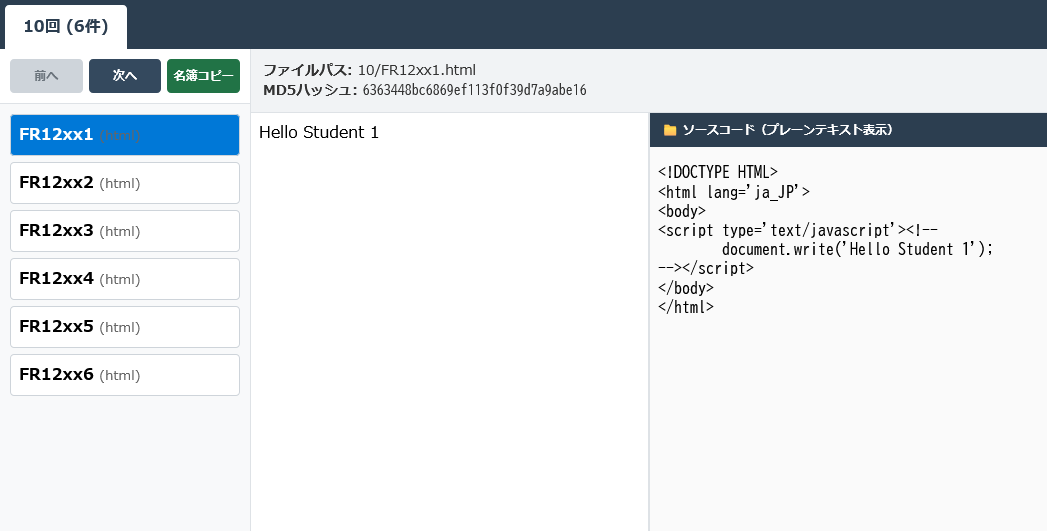
スクリーンショット
実際のもの
使い方
- 学生が提出したファイルを所定のフォルダにいれる。
- 次のシェルスクリプトを動かして、中のファイルの一覧を取得(list10.jsを作成)。
IN=$1 OUTPUT="list$IN.js" echo "registerList([" > $OUTPUT # フォルダ内のファイルに対してmd5sumを実行(隠しファイルやディレクトリは除外) find "$IN" -maxdepth 1 -type f ! -name "*.txt" | while read -r filepath; do # ソース表示用に、拡張子 .txt を付加したコピーファイルを作成 ln "$filepath" "${filepath}.txt" 2>/dev/null # md5sumを取得し、ハッシュ値とファイル名に分解 # 例: d41d8cd98f00b204e9800998ecf8427e 01/24X1001_xxx.html md5_res=$(md5sum "$filepath") hash=$(echo "$md5_res" | awk '{print $1}') # JSON/JavaScriptの配列形式で出力 echo " [\"$filepath\", \"$hash\"]," | tee -a $OUTPUT done echo "]);" >> $OUTPUT - ViewJS.htmlを開く。